Subdomain Enumeration with subfinder, puredns and httpx

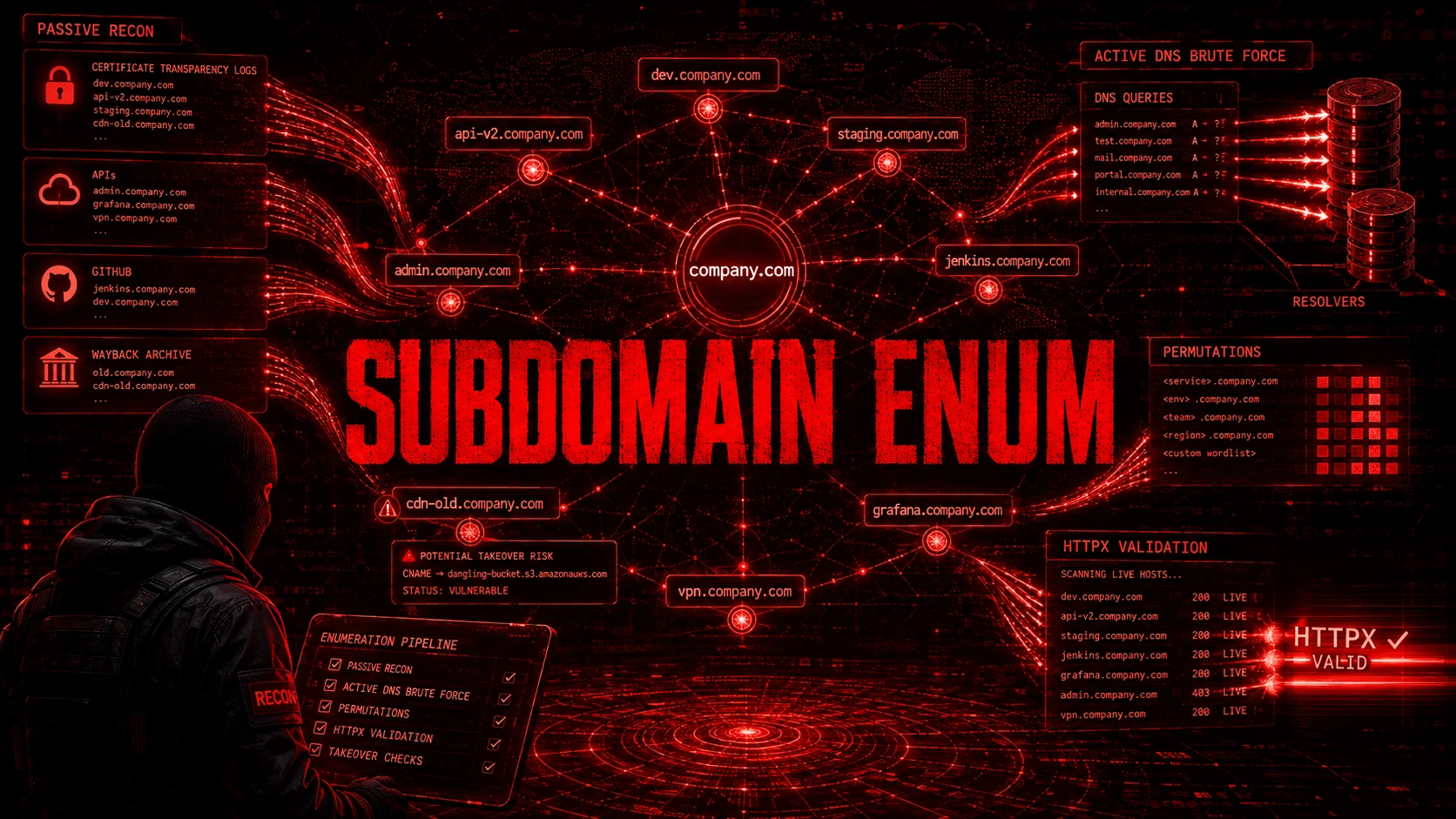
Subdomain enumeration pipeline: passive recon with subfinder, brute force with puredns, Alterx permutations, httpx validation and subdomain takeover check.
- Posted on 2026-08-18
- Reading time: 10 min
Subdomain Enumeration: Complete Guide to Subfinder, Amass, Puredns and DNS Brute Force #
A target like company.com has the homepage. Behind it has dev.company.com without authentication, api-v2.company.com with an old version of the backend, jenkins.company.com accessible from the internet, and cdn-old.company.com This points to a cloud service that is no longer configured correctly and potentially vulnerable to subdomain takeover. Finding these resources is called subdomain enumeration—and the difference between finding 10 and 200 lies in the quality of the pipeline.
This guide builds the complete pipeline: from zero noise (passive) to accurate brute force, intelligent permutations, and live validation. For DNS theory and low-level tools (dig, dnsrecon, zone transfer), see DNS.
Prerequisites: A wordlist for brute-force DNS (e.g., SecLists), DNS for basic concepts.
What is Subdomain Enumeration? #
Subdomain enumeration is the process of identifying the subdomains associated with a domain, such as dev.example.com, api.example.com o staging.example.comPenetration testing is used to expand the attack surface and identify exposed applications, APIs, development environments, and services that aren't visible on the main site. It's performed using passive or active techniques, or more often a combination of the two.
Passive vs Active Subdomain Enumeration #
| Method | DNS/Target Contact | Examples |
|---|---|---|
| passive | No direct probing of the target | CT logs, API, OSINT database |
| Active | Direct DNS query/probing | Brute force resolution |
| Hybrid | Both | Passive → brute force → validation |
Passive enumeration gathers information already available from public sources, without directly touching the target's infrastructure. Active enumeration, on the other hand, generates or verifies names directly via DNS—more noise, but it finds things that public sources have never indexed.
The Subdomain Enumeration Pipeline #
The most effective methodology combines passive enumeration, DNS brute force, permutation scanning, and HTTP validation.
1. PASSIVE    → subfinder, amass, assetfinder, crt.sh, chaos, GAU, GitHub
2. MERGE      → sort -u, dedup, filtraggio wildcard
3. ACTIVE     → puredns/massdns brute force + risoluzione
4. PERMUTAZIONI → alterx/gotator su sottodomini trovati
5. VALIDAZIONE  → httpx, subdomain takeover check
Each phase produces output that feeds the next. Don't skip the passive phase: it often allows you to obtain a significant portion of the surface area without brute-forcing DNS.
Best Subdomain Enumeration Tools #
| tool | Type | Swift | What does he do |
|---|---|---|---|
| subfinder | passive | ★ ★ ★ ★ ★ | Query dozens of API sources, CT logs, DNS databases |
| amass | Passive + Active | ★★ | In-depth OSINT, graph topology, many sources |
| asset finder | passive | ★ ★ ★ ★ ★ | Lightweight, quick win, crt.sh sources + certspotter |
| chaos | passive | ★ ★ ★ ★ ★ | ProjectDiscovery dataset, continuously updated |
| left | passive | ★ ★ ★ ★ | Wayback Machine, Common Crawl, OTX for subdomains |
| puredns | Active | ★ ★ ★ ★ ★ | Accurate brute force with native wildcard detection |
| massdns | Active | ★ ★ ★ ★ ★ | Massive DNS resolver, very high throughput |
| alterx | Permutations | ★ ★ ★ ★ | Generate variants of found subdomains |
| httpx | Validation | ★ ★ ★ ★ ★ | Check which ones respond to HTTP, status + tech |
| Target | Recommended tool |
|---|---|
| Fast passive enumeration | Subfinder |
| OSINT in-depth | amass |
| Quick enumeration | Assetfinder |
| Brute force DNS | Puredns |
| Mass DNS resolution | Massdns |
| Permutations | AlterX |
| HTTP validation | httpx |
| Takeover detection | Dedicated tools + manual verification |
Passive Subdomain Enumeration – Zero Contact with the Target #
How to Use Subfinder for Subdomain Enumeration #
Subfinder is a ProjectDiscovery tool designed primarily for passive subdomain enumeration. It aggregates results from multiple sources and produces a list of subdomains to pass to the next stages of the pipeline.
# Installa
go install -v github.com/projectdiscovery/subfinder/v2/cmd/subfinder@latest

# File di configurazione
nano ~/.config/subfinder/provider-config.yaml# provider-config.yaml — aggiungi le API key che hai
virustotal:
- TUA_API_KEY_VIRUSTOTAL
securitytrails:
- TUA_API_KEY_SECURITYTRAILS
shodan:
- TUA_API_KEY_SHODAN
censys:
- TUA_CENSYS_API_ID:TUA_CENSYS_SECRET
bevigil:
- TUA_BEVIGIL_KEY
chaos:
- TUA_CHAOS_KEY
# Fonti gratuite (no key):
# crt.sh, certspotter, dnsdumpster, alienvault, hackertarget...Setting up multiple providers can significantly increase your coverage, but the number of results varies depending on the domain and the sources actually available for that target. It's still worth setting them up—most offer a free plan that's sufficient for a pentest.
# Scan base (senza API keys)
subfinder -d target.com -o subfinder.txt

# Scan con tutte le fonti configurate
subfinder -d target.com -all -o subfinder.txt

# Solo output pulito (nessun banner)
subfinder -d target.com -all -silent -o subfinder.txt

# Rate limiting (per non fare ban da API)
subfinder -d target.com -all -rate-limit 10 -delay 3 -o subfinder.txt

# Scan su più domini da file
subfinder -dL domains.txt -all -silent -o subfinder_all.txtdev.target.com
api.target.com
staging.target.com
mail.target.com
vpn.target.com
admin.target.com
jenkins.target.com
grafana.target.com
-allEnable all configured sources, not just those without a key. Always use it on important targets: the difference in results compared to the default can be significant, and varies from case to case.
Assetfinder – Quick and Easy #
# Installa
go install github.com/tomnomnom/assetfinder@latest

# Uso base
assetfinder --subs-only target.com > assetfinder.txt

# Include anche domini correlati (stessa organizzazione)
assetfinder target.com > assetfinder_extended.txt
Chaos – ProjectDiscovery Dataset #
ProjectDiscovery maintains a continuously updated dataset of subdomains from bug bounty and public scanning.
# Installa (richiede API key gratuita da chaos.projectdiscovery.io)
go install github.com/projectdiscovery/chaos-client/cmd/chaos@latest

# Configura API key
export CHAOS_KEY="tua_api_key"

# Ricerca sottodomini
chaos -d target.com -o chaos.txt

# Output silenzioso
chaos -d target.com -silent > chaos.txt
How to Find Subdomains from Web Archives with GAU #
GAU (GetAllUrls) extracts URLs from the Wayback Machine, Common Crawl, and OTX — often containing legacy subdomains that are no longer advertised but are still live.
# Installa
go install github.com/lc/gau/v2/cmd/gau@latest

# Estrai sottodomini da archivi web
gau --subs target.com | unfurl -u domains | sort -u > gau_subs.txt

# Solo sottodomini unici
gau --threads 5 --subs target.com | grep "\.target\.com" | \
  awk -F/ '{print $3}' | sort -u > gau.txt
Certificate Transparency – crt.sh #
# Query diretta (senza tool)
curl -s "https://crt.sh/?q=%.target.com&output=json" | \
  jq -r '.[].name_value' | \
  sed 's/\*\.//g' | \
  grep -v "@" | \
  sort -u > crtsh.txt

# Versione con retry per grandi target
curl -s --retry 3 "https://crt.sh/?q=%.target.com&output=json" | \
  jq -r '.[].name_value' | \
  sed 's/\*\.//g' | sort -u > crtsh.txt
How to Find Exposed Subdomains on GitHub #
Developers often reference internal subdomains in code, config files, and READMEs. GitHub stores everything.
# Dork manuali su github.com (nel browser)
site:github.com "target.com" ext:env
site:github.com "target.com" inurl:config
site:github.com "staging.target.com"
site:github.com "internal.target.com"
site:github.com "target.com" "api_key"

# Con trufflehog per scan automatico di repo pubblici
curl -sSfL https://raw.githubusercontent.com/trufflesecurity/trufflehog/main/scripts/install.sh | sh
trufflehog github --org=targetorg --only-verified | grep target.com
Merge and Deduplication #
# Combina tutti i risultati passivi in un unico file
cat subfinder.txt assetfinder.txt chaos.txt crtsh.txt gau.txt | \
  sort -u | \
  grep "\.target\.com$" | \
  grep -v "^*" > passive_all.txt

echo "[+] Passive total: $(wc -l < passive_all.txt) unique subdomains"
DNS Brute Force with Puredns and Massdns #
What is Brute Force DNS? #
Brute force DNS involves testing a wordlist of possible hostnames against a domain — for example dev.example.com, api.example.com, staging.example.com — verifying which names actually resolve via DNS. Discovers subdomains not present in any public source: internal environments, staging, old API versions. Requires a good wordlist and reliable DNS resolvers.
Setup Resolver #
Public resolvers get banned quickly if you send millions of queries. Use a list of trusted public resolvers.
# Scarica lista resolver affidabili
curl -s https://raw.githubusercontent.com/trickest/resolvers/main/resolvers.txt \
  -o resolvers.txt
wc -l resolvers.txt
Puredns #
puredns handles DNS wildcards natively — you don't get false positives even if the domain has *.target.com → 1.2.3.4.
# Installa
go install github.com/d3mondev/puredns/v2@latest

# Brute force con wordlist
puredns bruteforce /usr/share/seclists/Discovery/DNS/subdomains-top1million-5000.txt \
  target.com \
  -r resolvers.txt \
  -w puredns_brute.txt

# Risolvi lista esistente (passivi trovati prima)
puredns resolve passive_all.txt -r resolvers.txt -w resolved_passive.txt

# Con rate limiting (gentile con i resolver)
puredns bruteforce wordlist.txt target.com \
  -r resolvers.txt \
  --rate-limit 500 \
-w puredns.txt[+] Brute forcing target.com with 5000 words
[+] Using 1024 resolvers
[+] Wildcard detected: *.target.com → 1.2.3.4 (filtered)
[+] Found: dev.target.com
[+] Found: api-v2.target.com
[+] Found: jenkins.target.com
[+] Found: 47 unique subdomainsMassdns #
massdns is the fastest resolver available, with very high throughput. Use it with shuffledns for massive brute force.
# Installa
git clone https://github.com/blechschmidt/massdns.git
cd massdns && make
sudo mv bin/massdns /usr/local/bin/

# Genera lista di target da brute force
sed "s/$/\.target\.com/" /usr/share/seclists/Discovery/DNS/subdomains-top1million-5000.txt \
  > brute_targets.txt

# Risolvi massivamente
massdns -r resolvers.txt -t A -o S -w massdns_out.txt brute_targets.txt

# Estrai solo quelli che risolvono
grep -oP '[\w\.-]+\.target\.com' massdns_out.txt | sort -u > massdns_found.txt
Shuffledns – Intelligent Wrapper on Massdns #
# Installa
go install -v github.com/projectdiscovery/shuffledns/cmd/shuffledns@latest

# Brute force con wildcard filtering automatico
shuffledns -d target.com \
  -w /usr/share/seclists/Discovery/DNS/subdomains-top1million-5000.txt \
  -r resolvers.txt \
  -o shuffledns.txt

# Risolvi lista esistente
shuffledns -d target.com \
  -list passive_all.txt \
  -r resolvers.txt \
  -o resolved.txt
Puredns vs. Massdns: Which One Should You Use? #
Puredns is generally more practical when you want to automatically handle wildcards and validation during brute force—it covers the entire workflow. Massdns is primarily a high-performance DNS resolver and requires more manual management (wordlist preprocessing, wildcard filtering aside). For a standard pentest, use puredns. For large volumes where maximum throughput is required, use massdns, possibly via shuffledns.
Subdomain Permutation Scanning #
What is Subdomain Permutation Scanning? #
Permutation scanning generates variants of previously discovered subdomains by combining prefixes, suffixes, and common patterns — such as dev, staging, test, prod and numerical versions. You found api.target.comPermutation scanning tries to generate and verify api-v2.target.com, api-staging.target.com, api-dev.target.com and similar variants.
alterx – Permutations with Patterns #
# Installa
go install github.com/projectdiscovery/alterx/cmd/alterx@latest

# Genera permutazioni da lista di sottodomini
cat resolved.txt | alterx -o permutations.txt

# Con pattern custom
cat resolved.txt | alterx \
  -enrich \
  -pattern "{{sub}}-dev,{{sub}}-staging,{{sub}}-test,{{sub}}-prod,{{sub}}-v2" \
  -o permutations.txt

# Risolvi le permutazioni generate
puredns resolve permutations.txt -r resolvers.txt -w resolved_perms.txt

echo "[+] New from permutations: $(wc -l < resolved_perms.txt)"# Input: api.target.com
# Output alterx:
api-dev.target.com
api-staging.target.com
api-test.target.com
api-v2.target.com
api-prod.target.com
dev-api.target.com
staging-api.target.comgotator – Alternative with Wordlist #
# Installa
go install github.com/Josue87/gotator@latest

# Genera permutazioni con wordlist custom
gotator -sub passive_all.txt \
  -perm /usr/share/seclists/Discovery/DNS/deepmagic.com-prefixes-top500.txt \
  -depth 1 -numbers 3 -md | \
  puredns resolve -r resolvers.txt > gotator_resolved.txt
How to check which subdomains are actually active #
A subdomain that resolves correctly via DNS doesn't necessarily mean it exposes an HTTP service. Therefore, the pipeline passes the results to httpx, which verifies HTTP/HTTPS and collects the status code, title, and detected technologies—in seconds across thousands of hosts.
# Combina tutti i trovati
cat puredns_brute.txt resolved_passive.txt resolved_perms.txt | \
  sort -u > all_subdomains.txt

# Validazione HTTP/HTTPS
cat all_subdomains.txt | httpx \
  -status-code \
  -title \
  -tech-detect \
  -follow-redirects \
  -o live_hosts.txt

echo "[+] Live hosts: $(wc -l < live_hosts.txt)"https://dev.target.com [200] [Development Portal] [PHP, Symfony]
https://api-v2.target.com [401] [API Gateway] [nginx]
https://jenkins.target.com [200] [Jenkins - Dashboard] [Jenkins]
https://grafana.target.com [302] [] [Grafana]
https://admin.target.com [200] [Admin Panel] [Apache, WordPress]Immediate focus on:
[200]on pathadmin,jenkins,grafana,kibana,dev→ access without authentication[401]→ exists, try credential stuffing with default credentials[302]→ follow the redirect
What is a Subdomain Takeover? #
A subdomain takeover occurs when a subdomain continues to point via DNS (typically a CNAME) to a third-party resource no longer controlled by the organization—a deleted S3 bucket, a decommissioned Heroku or Azure app. Under certain conditions, this allows the resource to be reclaimed and content to be served under the original subdomain. A CNAME pointing to an external service is not in itself evidence of a takeover—it's a candidate that should be verified.
Finding candidates with dnsx #
# Con dnsx — trova CNAME
cat all_subdomains.txt | dnsx -cname -resp -silent | \
  grep -E "s3\.amazonaws\.com|heroku\.com|github\.io|azurewebsites\.net|netlify\.app|vercel\.app" \
  > potential_takeover.txt
Check with subjack #
go install github.com/haccer/subjack@latest
curl -o fingerprints.json https://raw.githubusercontent.com/haccer/subjack/master/fingerprints.json

subjack -w all_subdomains.txt \
  -t 100 \
  -timeout 30 \
  -c fingerprints.json \
  -o takeover_results.txt

cat takeover_results.txt
# [Vulnerable] cdn-old.target.com → VULNERABLE (AWS S3)
Treat each line marked “Vulnerable” as a potential finding to be manually verified , not as an automatic confirmation — fingerprints can generate false positives, especially if not updated.
How to Automate Subdomain Enumeration #
The complete pipeline, in sequence, can be encapsulated in a script:
Passive → Dedup → DNS Resolution → Brute Force → Permutation → HTTP Validation → Takeover Check#!/bin/bash
# Subdomain Enumeration Pipeline
# Uso: ./subenum.sh target.com
DOMAIN=$1
OUT="./recon/$DOMAIN"
RESOLVERS="$HOME/resolvers.txt"
WORDLIST="/usr/share/seclists/Discovery/DNS/subdomains-top1million-5000.txt"
[[ -z $DOMAIN ]] && echo "Usage: $0 <domain>" && exit 1
mkdir -p $OUT/{passive,active,perms,final}
echo "[*] Target: $DOMAIN"
echo "[*] Output: $OUT"
# ── FASE 1: PASSIVE ────────────────────────────────────────
echo "[1/5] Passive enumeration..."
subfinder -d $DOMAIN -all -silent -o $OUT/passive/subfinder.txt
assetfinder --subs-only $DOMAIN > $OUT/passive/assetfinder.txt 2>/dev/null
chaos -d $DOMAIN -silent -o $OUT/passive/chaos.txt 2>/dev/null
curl -s "https://crt.sh/?q=%.$DOMAIN&output=json" | \
jq -r '.[].name_value' | sed 's/\*\.//g' | grep -v "@" | \
sort -u > $OUT/passive/crtsh.txt
gau --subs $DOMAIN 2>/dev/null | grep "\.$DOMAIN$" | sort -u > $OUT/passive/gau.txt
cat $OUT/passive/*.txt | sort -u | grep "\.$DOMAIN$" > $OUT/passive/all.txt
echo "[+] Passive: $(wc -l < $OUT/passive/all.txt) subdomains"
# ── FASE 2: RESOLVE PASSIVE ────────────────────────────────
echo "[2/5] Resolving passive results..."
puredns resolve $OUT/passive/all.txt -r $RESOLVERS -q \
-w $OUT/active/resolved_passive.txt
# ── FASE 3: BRUTE FORCE ────────────────────────────────────
echo "[3/5] Active brute force..."
puredns bruteforce $WORDLIST $DOMAIN -r $RESOLVERS -q \
-w $OUT/active/brute.txt
cat $OUT/active/*.txt | sort -u > $OUT/active/all.txt
echo "[+] Active: $(wc -l < $OUT/active/all.txt) subdomains"
# ── FASE 4: PERMUTAZIONI ───────────────────────────────────
echo "[4/5] Generating permutations..."
cat $OUT/active/all.txt | alterx -silent | \
puredns resolve -r $RESOLVERS -q -w $OUT/perms/resolved.txt 2>/dev/null
echo "[+] Permutations: $(wc -l < $OUT/perms/resolved.txt 2>/dev/null || echo 0)"
# ── FASE 5: VALIDAZIONE ────────────────────────────────────
echo "[5/5] HTTP validation..."
cat $OUT/active/all.txt $OUT/perms/resolved.txt 2>/dev/null | sort -u | \
httpx -status-code -title -tech-detect -silent \
-o $OUT/final/live_hosts.txt
# ── TAKEOVER CHECK ─────────────────────────────────────────
cat $OUT/active/all.txt | dnsx -cname -resp -silent | \
grep -E "s3\.amazonaws|heroku\.com|github\.io|azurewebsites|netlify|vercel" \
> $OUT/final/potential_takeover.txt
echo ""
echo "═══ RISULTATI ═══"
echo "Subdomains trovati: $(cat $OUT/active/all.txt $OUT/perms/resolved.txt 2>/dev/null | sort -u | wc -l)"
echo "Live HTTP hosts: $(wc -l < $OUT/final/live_hosts.txt)"
echo "Potenziali takeover: $(wc -l < $OUT/final/potential_takeover.txt)"
echo "Output: $OUT/final/"Recommended Methodology #
1. PASSIVE PRIMA (sempre, zero rumore)
   └─ subfinder -all + assetfinder + crtsh + chaos
   └─ Merge e dedup

2. RISOLVI I PASSIVI
   └─ puredns resolve (filtra wildcard, verifica A record)

3. BRUTE FORCE ATTIVO
   └─ puredns bruteforce + wordlist 5k-20k
   └─ shuffledns come alternativa

4. PERMUTAZIONI (se engagement approfondito)
   └─ alterx su tutti i risolti
   └─ puredns resolve sulle permutazioni

5. VALIDA CON HTTPX
   └─ Status code + titolo + tech-detect
   └─ Focus su: admin, jenkins, grafana, dev, staging senza auth

6. TAKEOVER CHECK
   └─ dnsx -cname + grep cloud providers
   └─ subjack per check automatico, verifica manuale dei positivi
Troubleshooting #
| Problem | Cause | Solution |
|---|---|---|
| Subfinder finds few results | No API key configured | Configure API keys in ~/.config/subfinder/provider-config.yaml |
| puredns very slow | Too many unreliable resolvers | Update resolvers.txt: Download verified list |
| False positives in the thousands | Wildcard DNS | puredns handles wildcards automatically — use that, not massdns raw |
| Chaos doesn't work | API key missing | Record at chaos.projectdiscovery.io (free) |
| alterx generates too many results | Pattern too large | Limit with -pattern specify or reduce wordlist |
| Subdomain takeover false positives | Fingerprints not updated | Update subjack's fingerprints.json, always verify manually |
FAQ #
What is subdomain enumeration? The process of finding all subdomains associated with a target domain to expand the attack surface during a pentest.
What's the best tool for finding subdomains? There's more than one: subfinder for fast passive enumeration, amass for in-depth OSINT, puredns for accurate brute force. The combination is more effective than any single tool.
Subfinder or Amass: which should you choose? Subfinder for speed—results in tens of seconds. Amass for more in-depth coverage on critical targets, at the cost of longer runs. In practice: start with Subfinder, add Amass if the engagement justifies it.
Puredns or Massdns: which should you use? Puredns for accuracy and automatic wildcard management and validation. Massdns for pure throughput on huge volumes, with more manual management. For a standard pentest, puredns.
What's the difference between passive and active enumeration? Passive enumeration collects already public data (CT logs, APIs, OSINT) without touching the target. Active enumeration directly queries the target's DNS (brute force, resolution), generating observable traffic.
How do I find subdomains not indexed by any public source? Use brute-force DNS (puredns/massdns) and permutations (alterx/gotator) on previously found subdomains.
How do I verify if a subdomain is actually active? With httpx, resolving via DNS isn't enough; you need to verify that it actually exposes a reachable HTTP/HTTPS service.
What is a subdomain takeover? When a subdomain still points, via DNS, to a third-party resource no longer controlled by the organization—in some cases making it claimable by an attacker.
Final Cheat Sheet #
=== PASSIVE ===
subfinder:    subfinder -d target.com -all -silent -o subs.txt
assetfinder:  assetfinder --subs-only target.com > asset.txt
chaos:        chaos -d target.com -silent > chaos.txt
crt.sh:       curl -s "https://crt.sh/?q=%.target.com&output=json" | jq -r '.[].name_value' | sort -u
GAU:          gau --subs target.com | grep "\.target\.com$" | sort -u
Merge:        cat *.txt | sort -u | grep "\.target\.com$" > all_passive.txt

=== ACTIVE BRUTE FORCE ===
puredns:      puredns bruteforce wordlist.txt target.com -r resolvers.txt -w out.txt
shuffledns:   shuffledns -d target.com -w wordlist.txt -r resolvers.txt -o out.txt
Resolvers:    curl -s https://raw.githubusercontent.com/trickest/resolvers/main/resolvers.txt -o resolvers.txt

=== RISOLUZIONE ===
puredns:      puredns resolve passive.txt -r resolvers.txt -w resolved.txt
dnsx:         dnsx -l passive.txt -resp -o dnsx.txt

=== PERMUTAZIONI ===
alterx:       cat resolved.txt | alterx | puredns resolve -r resolvers.txt > perms.txt
gotator:      gotator -sub resolved.txt -perm prefixes.txt -depth 1 | puredns resolve -r resolvers.txt

=== VALIDAZIONE ===
httpx:        cat all.txt | httpx -status-code -title -tech-detect -o live.txt
Filter 200:   cat all.txt | httpx -mc 200 -silent

=== TAKEOVER ===
dnsx cname:   cat all.txt | dnsx -cname -resp | grep -E "s3|heroku|github\.io|azure|netlify|vercel"
subjack:      subjack -w all.txt -c fingerprints.json -o takeover.txt

=== API KEYS (subfinder) ===
Config:       ~/.config/subfinder/provider-config.yaml
Fonti key:    securitytrails, shodan, virustotal, censys, bevigil, chaos
Related guides on hackita.it:
- DNS Enumeration: Zone Transfer, dnsrecon and Brute Force DNS
- Wordlists and SecLists: Which DNS List to Use
- Reconnaissance: OSINT and Information Collection
- Linux Enumeration